Why AI Applications Need Background Workflows
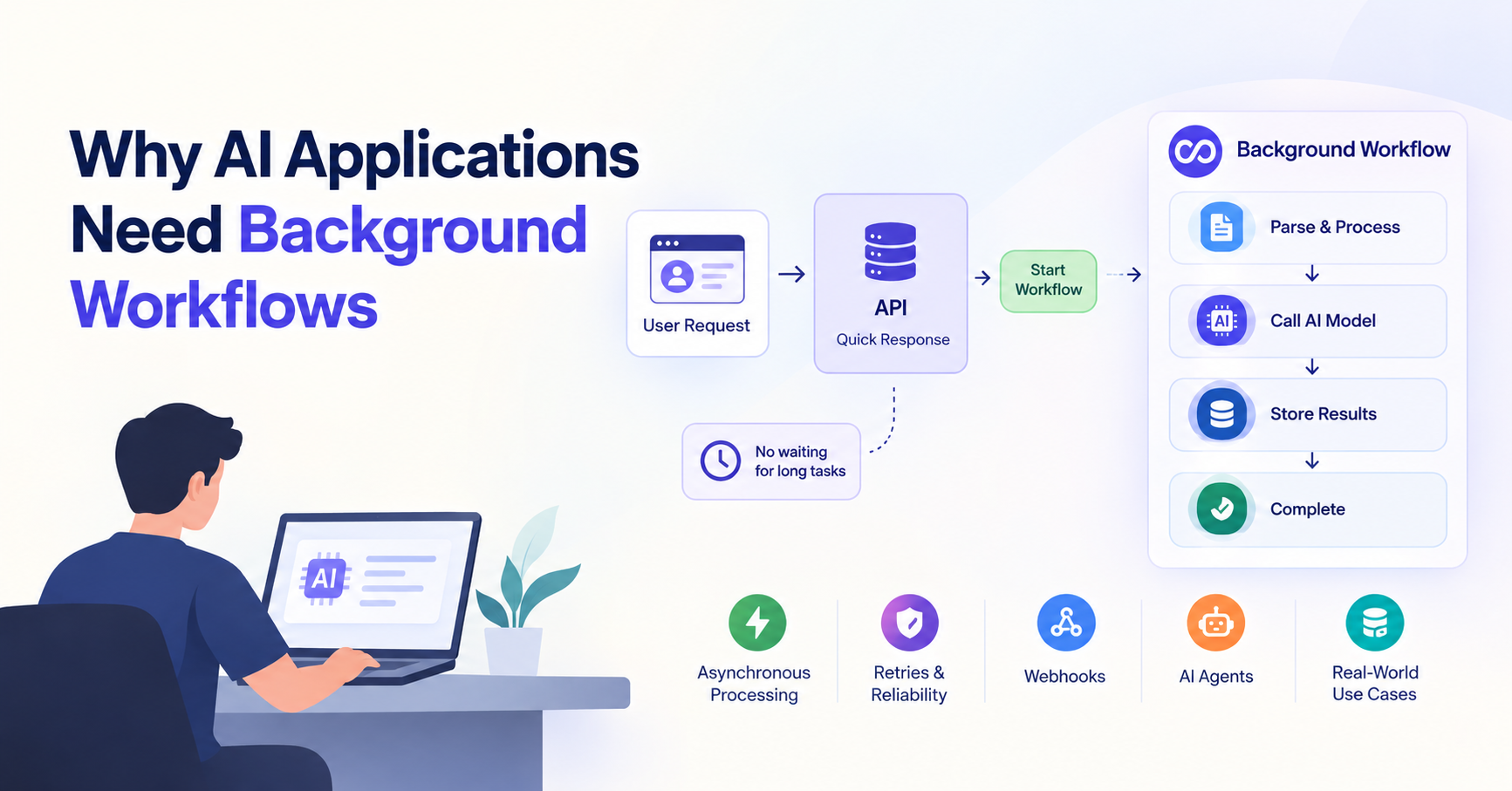
AI applications often start with a simple idea: a user sends a request, the application calls an AI model, and a response comes back. That model works well when the task takes a few seconds. But production AI applications rarely stay that simple. A document might need to be parsed and embedded, an AI agent might need to inspect a repository and run several tools, or a research task might require dozens of model and API calls. Trying to do all of this inside one HTTP request creates problems. This is where background workflows become useful. Instead of making the user wait for every operation to finish, the application starts the work in the background and lets a workflow manage the execution.
The Problem With Doing Everything Inside a Web Request
Consider a document-processing endpoint:
POST /documents/123/process
The server receives the request and starts processing the document. It might download the file, extract the text, split it into chunks, generate embeddings, store them in a vector database, and finally update the document status. A simple implementation might look like this:
app.post("/documents/:id/process", async (req, res) => {
  const document = await downloadDocument(req.params.id);
  const text = await extractText(document);
  const chunks = await chunkText(text);
  const embeddings = await generateEmbeddings(chunks);
  await storeEmbeddings(embeddings);
  await markDocumentAsProcessed(req.params.id);
  res.json({ success: true });
});
There is nothing inherently wrong with this code. The problem appears when the operation becomes slow or unreliable. A large document can take a long time to process. An embedding provider might temporarily fail. A network request might time out. Your hosting platform may have a request timeout. And if the process crashes near the end, you may have to start the whole operation again. More importantly, the user usually doesn't need to keep an HTTP request open while all of this happens. A better approach is to let the request start the operation and return quickly:
User
  ↓
API
  ↓
"Processing started"
  ↓
Background Workflow
  ↓
Parse → Chunk → Embed → Store
The web request handles the user-facing part. The background workflow handles the work that can take longer.
Why AI Tasks Are Different
Traditional web applications usually perform predictable operations:
Request
  ↓
Validate
  ↓
Database query
  ↓
Response
AI applications often involve much more work:
Request
  ↓
Retrieve context
  ↓
Call model
  ↓
Call a tool
  ↓
Process result
  ↓
Call model again
  ↓
Run another tool
  ↓
Verify result
  ↓
Generate final response
An AI agent makes this even less predictable because the number of steps can depend on the task. For example, a coding agent reviewing a pull request might fetch the changed files, inspect related files, search the repository, run tests, analyze failures, ask an LLM for recommendations, and finally post comments back to GitHub. That is no longer a small API operation. It is a workflow.
What Is a Background Workflow?
A background workflow is a sequence of operations that runs independently from the original web request. Instead of:
HTTP Request
  ↓
Do everything
  ↓
HTTP Response
you have:
HTTP Request
  ↓
Start Workflow
  ↓
HTTP Response
       ...
Background Workflow
  ↓
Step 1
  ↓
Step 2
  ↓
Step 3
  ↓
Result
The important difference between a simple background job and a workflow is that a workflow can represent multiple related steps and their dependencies. For example:
Document Uploaded
      ↓
Extract Text       ✓
      ↓
Create Chunks      ✓
      ↓
Generate Embeddings ✗
      ↓
Retry
      ↓
Generate Embeddings ✓
      ↓
Store Vectors      ✓
      ↓
Completed
The workflow knows what has already succeeded and what still needs to happen. This becomes particularly valuable when individual steps involve external APIs or expensive AI operations.
Why AI Applications Need Asynchronous Processing
Asynchronous processing simply means the user doesn't have to wait for the entire operation to complete before the initial request finishes. Suppose a user uploads a large PDF. The API can create a database record, store the file, and emit an event:
{
  "documentId": "doc_123",
  "status": "processing"
}
The request can finish while the document continues processing in the background. The frontend can later show:
Processing document...
✓ File uploaded
✓ Text extracted
● Generating embeddings
○ Indexing
This approach has several benefits. First, the API stays responsive because it isn't holding a request open for a long-running operation. Second, the work can continue even if the user closes the browser. Third, failures can be handled independently. A temporary failure in an embedding provider doesn't necessarily mean the entire document-processing operation has to be abandoned. Finally, background workflows make it easier to scale. Multiple documents can be processed independently instead of tying each one to a long-running web request.
What Inngest Does
Inngest provides infrastructure for running background functions and durable workflows. Instead of building all of the execution logic yourself, you can define functions that respond to events and break longer operations into steps. The basic idea looks like this:
Your Application
      │
      │ Event
      ▼
   Inngest
      │
      ▼
Background Function
      │
      ├── Step 1
      ├── Step 2
      ├── Step 3
      └── Step 4
For example, a document workflow can be structured like:
export const processDocument = inngest.createFunction(
  { id: "process-document" },
  { event: "document/uploaded" },
  async ({ event, step }) => {
    const text = await step.run("extract-text", async () => {
      return extractText(event.data.fileUrl);
    });
    const chunks = await step.run("create-chunks", async () => {
      return chunkText(text);
    });
    const embeddings = await step.run("generate-embeddings", async () => {
      return generateEmbeddings(chunks);
    });
    await step.run("store-embeddings", async () => {
      return storeEmbeddings(embeddings);
    });
  },
);
The important part isn't the syntax. It is the structure. Each meaningful operation becomes a step that the workflow system can track and execute independently.
Events and Workflow Execution
A common way to start a background workflow is with an event. An event represents something that happened:
document/uploaded
github/pull-request-opened
report/requested
customer/signed-up
Your application can emit an event:
await inngest.send({
  name: "document/uploaded",
  data: {
    documentId: "doc_123",
    fileUrl: "https://example.com/file.pdf",
  },
});
A workflow listening for that event can then start processing it. This creates a clean separation between the API and the actual work. The API doesn't need to know every detail about how a document should be processed. It simply reports that a document was uploaded. The workflow owns everything that happens afterward:
Event
  ↓
Inngest
  ↓
Document Workflow
  ↓
Parse
  ↓
Chunk
  ↓
Embed
  ↓
Store
This event-driven model also makes it easier to add new behavior later without turning the original API endpoint into a large collection of unrelated operations.
Webhooks Can Trigger AI Workflows
Events don't have to come from your own application. External services can trigger workflows through webhooks. GitHub is a good example. When someone opens a pull request, GitHub can send a webhook to your application:
GitHub PR
   ↓
Webhook
   ↓
Your API
   ↓
Event
   ↓
Inngest
   ↓
AI Code Review Workflow
The webhook handler should generally acknowledge the request quickly instead of performing the entire AI review inside it. For example:
app.post("/webhooks/github", async (req, res) => {
  const payload = req.body;
  await inngest.send({
    name: "github/pull-request-opened",
    data: {
      repository: payload.repository.full_name,
      pullRequest: payload.pull_request.number,
    },
  });
  res.sendStatus(202);
});
The workflow can then perform the expensive operations:
Fetch PR
  ↓
Get changed files
  ↓
Gather repository context
  ↓
Run AI Agent
  ↓
Run tests
  ↓
Validate findings
  ↓
Post GitHub comments
This pattern is useful whenever an external event starts work that may take longer than a normal webhook request should handle.
Retries and Reliable Execution
AI applications depend on many external services. Your model provider can return an error, a database can temporarily become unavailable, or an API can return a rate-limit response. A production system should expect these failures instead of assuming every operation will succeed. For example:
Generate Embeddings
       ↓
     Failure
       ↓
     Retry
       ↓
     Retry
       ↓
    Success
The same idea applies to larger workflows:
Fetch Repository      ✓
Analyze Files         ✓
Generate Review       ✓
Post Comments         ✗
                       ↓
                     Retry
                       ↓
                    Success
This is especially useful for expensive AI workflows. If an agent has already spent a minute gathering context, you don't want a temporary failure in the final step to force the entire operation to start again. Retries should also be selective. A temporary timeout may be worth retrying, while invalid input or an authentication failure usually isn't. The goal isn't to retry everything forever. The goal is to make temporary failures recoverable without losing the entire workflow.
Agents Inside Background Workflows
Agents are one of the strongest use cases for background workflows because agents often perform multiple operations before producing an answer. Consider a code-review agent:
Pull Request
    ↓
Fetch Repository
    ↓
Inspect Changes
    ↓
Search Relevant Code
    ↓
Run Tests
    ↓
Ask LLM
    ↓
Verify Findings
    ↓
Post Review
The agent can handle the reasoning: deciding what files to inspect, which tools to call, and what to investigate next. The workflow handles the execution around the agent: starting the process, managing steps, handling failures, and continuing the operation. This separation is useful because the agent shouldn't have to manage every infrastructure concern itself. A useful mental model is:
The agent decides what to do next. The workflow makes sure the overall process runs reliably.
Real-World AI Workflows
Background workflows fit into many AI applications.
Document Processing
A document platform might process an uploaded file like this:
Upload
  ↓
Extract Text
  ↓
Chunk
  ↓
Generate Embeddings
  ↓
Store in Vector Database
  ↓
Mark Document Ready
This is useful for PDFs, Markdown files, websites, transcripts, and large collections of documents.
AI Code Review
A coding assistant can start a workflow whenever a pull request is opened:
GitHub
  ↓
Webhook
  ↓
Workflow
  ↓
AI Agent
  ↓
Code Analysis
  ↓
Tests
  ↓
Review Comments
Research Agents
A research agent might search multiple sources, collect information, compare results, and generate a report.
Research Request
  ↓
Search
  ↓
Collect Sources
  ↓
Analyze
  ↓
Search Again
  ↓
Generate Report
  ↓
Save Result
Because the process can involve many external calls, running it as a background workflow is often more practical than keeping one HTTP request open.
AI Content Pipelines
A content application might take a video and generate several outputs:
Video Uploaded
  ↓
Transcription
  ↓
Summarization
  ↓
Key Moments
  ↓
Social Posts
  ↓
Titles
  ↓
Final Content
Each stage can be represented as part of a larger workflow.
When Should You Use a Background Workflow?
Not every operation needs one. A normal request is perfectly appropriate for things like fetching user information, validating input, or performing a quick database operation. A background workflow becomes useful when the work is:
Long-running
Multi-step
Dependent on external APIs
Expensive to execute
Likely to need retries
Triggered by an event or webhook
Independent of the user's browser connection A simple rule is:
If the user doesn't need to wait for the work to finish, and the work may take time or fail along the way, consider making it a background workflow.
Conclusion
As AI applications become more capable, the simple request → model → response architecture starts to break down. Document processing, AI agents, code review, research, content generation, and other AI workloads often involve multiple steps, external services, and unpredictable execution times. Trying to perform all of that inside one web request makes the application harder to scale and less reliable. Background workflows provide a better boundary. The API can respond quickly, while the workflow continues the actual work in the background. Events and webhooks can start workflows, individual steps can be retried, and agents can operate as part of a larger execution process. Tools such as Inngest make this architecture easier to implement, but the underlying idea is bigger than any particular tool. The key shift is simple:
The job of an AI API isn't always to finish the work. Sometimes its job is to start the work reliably and let a background workflow take it from there.

